Eval - Configuration Validation
Eval provides fast configuration validation without running expensive production jobs. Use it to catch errors early in your development workflow.
What Eval Checks
- All source tables exist and are accessible
- Column names and types match your configuration
- Query syntax is valid (for StagingQueries)
- Derivations compile and type-check correctly
- Dependencies between configurations resolve correctly
Quick Schema Validation
The most common use case - validate your configuration without running any computations:
zipline hub eval compiled/joins/{team}/{your_conf}This will show you the output schema, lineage, and catch configuration errors early. Example output:
🟢 Eval job finished successfully
Join Configuration: gcp.demo.user_features__1
  - Left table: data.user_activity_7d__0
  - Join parts: 2
  - Conf dependencies: 3
  - External tables: 2
  - Output Schema:
   [left]    user_id: string
   [left]    event_timestamp: long
   [left]    ds: string
   [joinPart: gcp.user_demographics__0]    user_id_age: integer
   [derivation]    is_adult: boolean

Lineage:
[Join] gcp.demo.user_features__1
├── ✅ [GroupBy] gcp.user_activity_7d__0
│   └── External: project.events.user_clicks
└── ✅ [GroupBy] gcp.user_demographics__0
    └── ✅ [StagingQuery] gcp.raw_demographics__0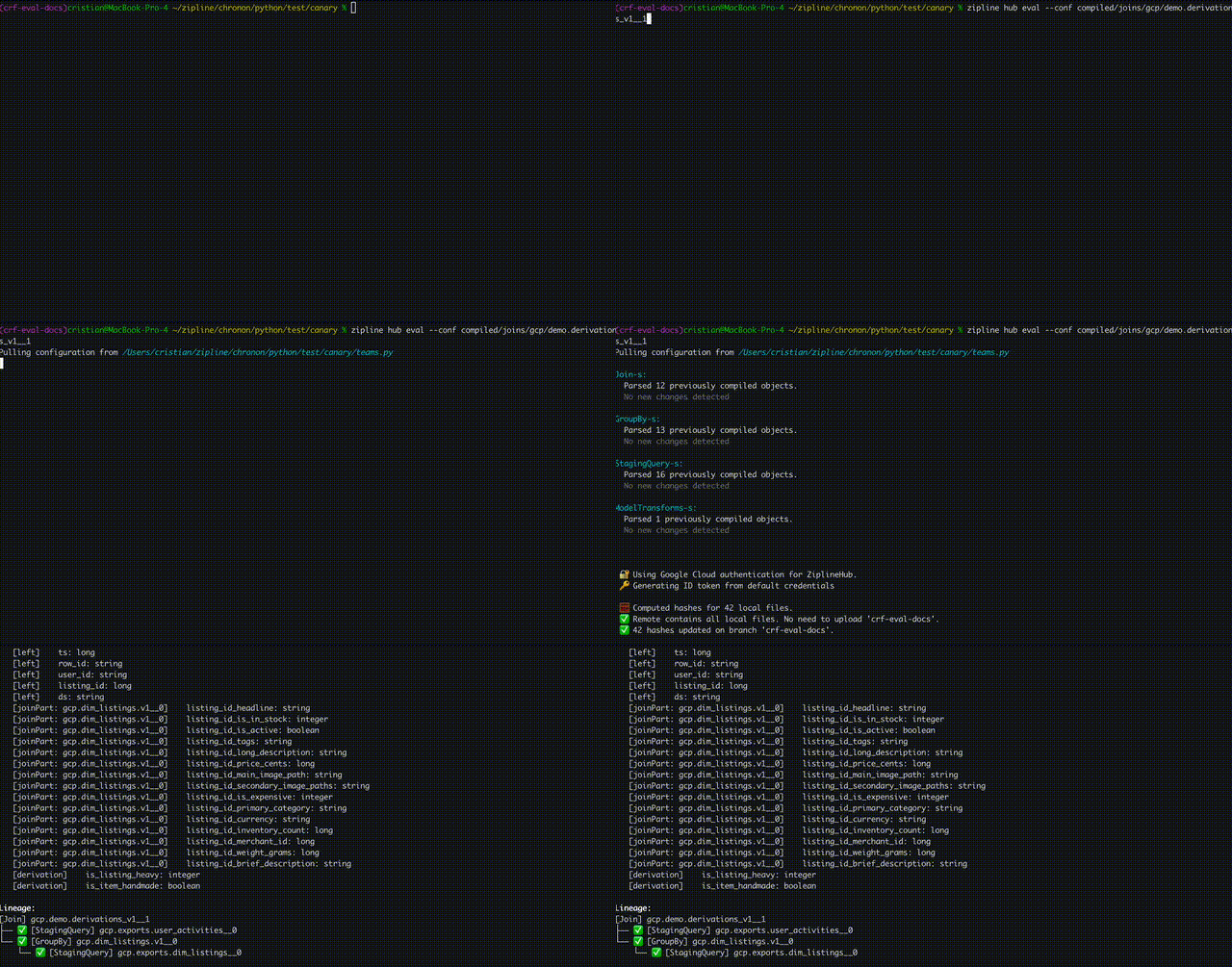
Sync Once, Evaluate Concurrently
After one normal eval has compiled and synced the repository, use --skip-sync to skip config uploads and branch sync for subsequent evaluations. Combine it
with --skip-compile to reuse the same compiled configs across concurrent runs:
# Compile and sync all configs before starting concurrent evaluations.
zipline hub eval compiled/joins/{team}/{first_conf}

zipline hub eval compiled/joins/{team}/{second_conf} --skip-compile --skip-sync &
zipline hub eval compiled/joins/{team}/{third_conf} --skip-compile --skip-sync &
wait
The local compiled configs and their dependencies must match versions already
uploaded to the Hub. --skip-sync still uploads sample data when --test-data-path is provided.
Testing with Sample Data
For deeper validation, provide sample data to see actual computation output:
# 1. Generate a test data skeleton
zipline hub eval compiled/joins/{team}/{your_conf} --generate-test-config

# 2. Fill in test-data.yaml with sample data (use !epoch for timestamps)

# 3. Run eval with test data
zipline hub eval compiled/joins/{team}/{your_conf} --test-data-path test-data.yaml
This will show you the actual computed results with your sample data, helping you validate:
- Complex aggregations and window functions
- Derivation logic with concrete examples
- Join key matching behavior
- Null value handling
Local Eval for CI/CD
For automated testing in CI/CD pipelines without requiring metastore access, you can use the ziplineai/local-eval Docker image with a preloaded Iceberg warehouse.
Key Benefits
- No metastore required - Completely offline testing
- No cloud access needed - Works in any CI environment
- Fast feedback - Validate configurations in pull requests
- Full control - Define your own test schemas and data
- Ideal for CI systems - GitHub Actions, GitLab CI, Jenkins, etc.
Setup Steps
1. Create Test Warehouse with PySpark
Create a Python script to build your Iceberg warehouse with test data. The example below is based on platform/docker/eval/examples/build_warehouse.py:
#!/usr/bin/env python3
"""Build a local Iceberg warehouse with test data for Chronon Eval testing."""

import os
from datetime import datetime
from pyspark.sql import SparkSession

def epoch_millis(iso_timestamp):
    """Convert ISO timestamp to epoch milliseconds"""
    dt = datetime.fromisoformat(iso_timestamp.replace("Z", "+00:00"))
    return int(dt.timestamp() * 1000)

def build_warehouse(warehouse_path, catalog_name="ci_catalog"):
    """Create Iceberg warehouse with test data"""

    print(f"Creating test warehouse at: {warehouse_path}")
    os.makedirs(warehouse_path, exist_ok=True)

    # Initialize Spark with Iceberg support
    spark = (
        SparkSession.builder
        .appName("chronon-test-warehouse-builder")
        .master("local[*]")
        .config("spark.jars.packages",
                "org.apache.iceberg:iceberg-spark-runtime-3.5_2.12:1.4.3")
        .config("spark.sql.extensions",
                "org.apache.iceberg.spark.extensions.IcebergSparkSessionExtensions")
        .config(f"spark.sql.catalog.{catalog_name}",
                "org.apache.iceberg.spark.SparkCatalog")
        .config(f"spark.sql.catalog.{catalog_name}.type", "hadoop")
        .config(f"spark.sql.catalog.{catalog_name}.warehouse", warehouse_path)
        .getOrCreate()
    )

    # Create namespace
    print("Creating namespace 'data'...")
    spark.sql("CREATE NAMESPACE IF NOT EXISTS data")
    spark.sql(f"USE {catalog_name}")

    # Create table with schema
    print("Creating user_activities table...")
    spark.sql("""
        CREATE TABLE IF NOT EXISTS data.user_activities__0 (
            user_id STRING,
            event_time_ms BIGINT,
            session_id STRING,
            event_type STRING,
            ds STRING
        ) USING iceberg
        PARTITIONED BY (ds)
    """)

    # Insert test data
    user_activities_data = [
        ("user_1", epoch_millis("2025-01-01T00:01:00Z"), "session_1", "view", "2025-01-01"),
        ("user_2", epoch_millis("2025-01-01T00:02:00Z"), "session_2", "click", "2025-01-01"),
    ]

    df = spark.createDataFrame(
        user_activities_data,
        ["user_id", "event_time_ms", "session_id", "event_type", "ds"]
    )

    df.writeTo(f"{catalog_name}.data.user_activities__0").createOrReplace()
    print(f"✓ Inserted {df.count()} rows into user_activities__0")

    spark.stop()
    print(f"\n✓ Warehouse created successfully at: {warehouse_path}")

if __name__ == "__main__":
    build_warehouse("/tmp/chronon-test-warehouse")
Run this script to create your test warehouse:
python scripts/build_warehouse.py2. Start Local Eval Service
Run the local-eval Docker container with the warehouse mounted:
docker run -d
  --name chronon-eval-service
  -e CHRONON_ROOT=/configs
  -e CHRONON_EVAL_WAREHOUSE_PATH=/warehouse
  -e CHRONON_EVAL_WAREHOUSE_CATALOG=ci_catalog
  -v /tmp/chronon-test-warehouse:/warehouse:ro
  -v $(pwd):/configs:ro
  -p 3904:8080
  ziplineai/local-eval:latest
Environment variables:
CHRONON_ROOT- Path to directory containingcompiled/configs (required)CHRONON_EVAL_WAREHOUSE_PATH- Path to Iceberg warehouse directory (required)CHRONON_EVAL_WAREHOUSE_CATALOG- Catalog name (must match catalog used when building warehouse)SERVER_PORT- HTTP port (default:8080)
3. Run Eval Commands
# Check service is running
curl http://localhost:3904/ping

# Run eval against local service
zipline hub eval compiled/joins/{team}/{your_conf} --eval-url http://localhost:3904
Recommended Workflow
During development: Use quick schema validation
zipline compile
zipline hub eval compiled/joins/{team}/{your_conf}
Before submitting PR: Test with sample data
zipline hub eval compiled/joins/{team}/{your_conf} --test-data-path test-data.yamlIn CI/CD: Use local-eval with preloaded Iceberg warehouse
- Automated validation on every PR
- No cloud dependencies
- Fast feedback loop
After PR approval: Run backfill
zipline hub backfill compiled/joins/{team}/{your_conf} --start-ds 2024-01-01 --end-ds 2024-01-02