Setup
PoC Prerequisites (AWS)
Note: For teams deploying licensed Zipline in their own AWS account (PoC or production). On GCP? See PoC Prerequisites (GCP). Self-hosting Chronon or using the public demo? Skip this page.
Zipline runs Spark and Flink on Amazon EKS in a dedicated AWS account colocated with your data—no existing Spark cluster needed, and data scientists use only the Chronon Python API. Your engineer runs Terraform paired with Zipline (~90 min, mostly terraform apply).
Scoping
Align on these inputs first so Zipline can size the environment:
- Use cases: 1–2 models covering batch features, real-time features, and online serving.
- Scale: Approximate table sizes, stream throughput, and online latency/QPS targets.
- Region: AWS Region of your data lake or warehouse (S3, Snowflake, or Databricks).
- Instance families: Preferred EC2 families for sizing vCPU quotas.
Deployment Overview
- Zipline provides: Access to
zipline-ai/infrastructure, Docker Hub token, and release version. - Terraform creates: EKS cluster, RDS Postgres, DynamoDB,
zipline-<customer>-*S3 buckets, IAM roles, and an internet-facing ALB.
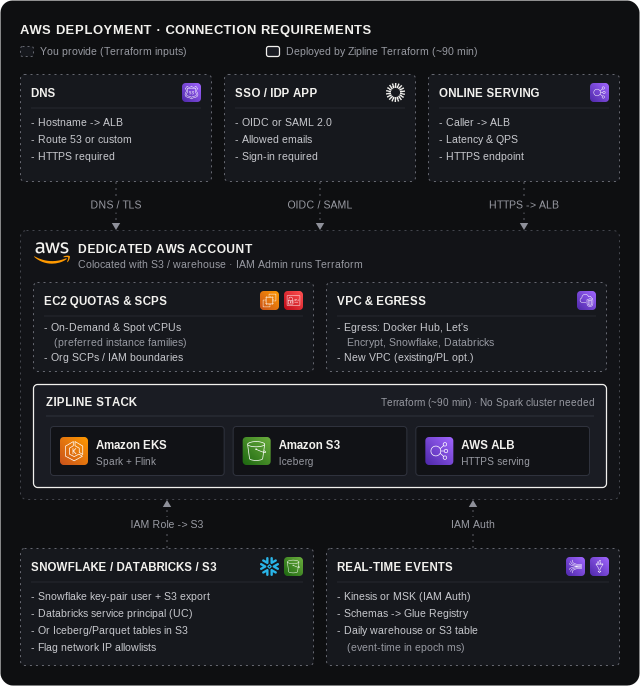
What You Provide
- AWS account & IAM: Dedicated AWS account (same region as your data) + IAM Admin. SCPs/permission boundaries must allow EC2, EKS, ELB, S3, RDS, DynamoDB, Glue, Secrets Manager, IAM, and AMP.
- Terraform state: Private, versioned S3 bucket.
- EC2 quotas: On-Demand and Spot vCPU quotas on your preferred instance families (raise low new-account defaults beforehand; Zipline sends target vCPUs once volumes are known).
- VPC & egress: New VPC with public ALB subnets by default, or 2 public subnets across AZs in an existing VPC. Outbound access to Docker Hub, Let's Encrypt, and Snowflake/Databricks; flag PrivateLink or IP allowlists early.
- DNS: Hostname (e.g.,
zipline.<your-domain>) in Route 53 or your DNS, CNAMEd to the deployed ALB (Let's Encrypt or bring-your-own cert). - Batch data (one of):
- Snowflake: Read-only service user (key-pair auth), warehouse (your credits), and S3 Storage Integration + IAM role to export Iceberg to S3.
- Databricks: See Databricks below.
- S3: Iceberg or Parquet tables landed in S3.
- Real-time events: Kinesis or MSK (IAM auth), Glue Schema Registry schemas, and a daily Snowflake/Databricks/S3 table through yesterday (event time in epoch ms).
- Sign-in (SSO): OIDC/SAML 2.0 (Okta, Entra ID, etc.) or Google/GitHub OAuth app + allowed emails/domains. HTTPS and sign-in are required (Authentication).
- Online serving: Calling service for the ALB endpoint (plus latency/QPS targets).
Databricks
Reads Delta via Unity Catalog and writes Iceberg via the Unity Catalog Iceberg REST API (Project Setup):
- Workspace: Unity Catalog workspace URL in the same AWS Region.
- Service principal: OAuth secret (stored in AWS Secrets Manager during deploy).
- Grants:
USE CATALOG,USE SCHEMA,SELECTon source tables;CREATE TABLE+EXTERNAL USE SCHEMAon the output schema; external data access enabled on the metastore. - Network: Outbound access to the workspace URL (allowlist Zipline egress IPs if IP-restricted).
Roles
| Role | Time | Responsibilities |
|---|---|---|
| Deployment lead (1) | ~30 min/wk | Scope, success criteria, access requests. |
| Cloud, platform & data engineer | ~1.5 days | AWS account, quotas, IdP app, DNS, Terraform deploy, and batch data access (Snowflake, Databricks, or S3). |
| Data scientists (1–2) | Few hrs/wk | Feature logic, Chronon Python API (private Git repo), output review. No AWS IAM access needed. |
Next Steps
- Set catalog and storage paths in
teams.py(Project Setup). - Sign in via CLI (CLI Authentication).
- Author, backfill, deploy, and serve features (Quickstart).